第三方连接
连接
配置第三方连接
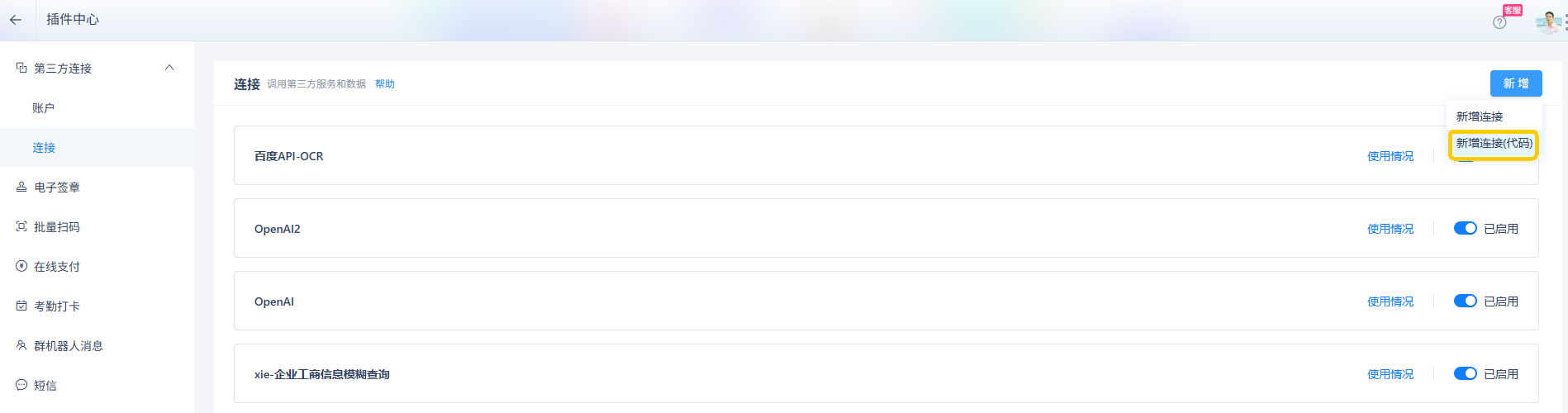
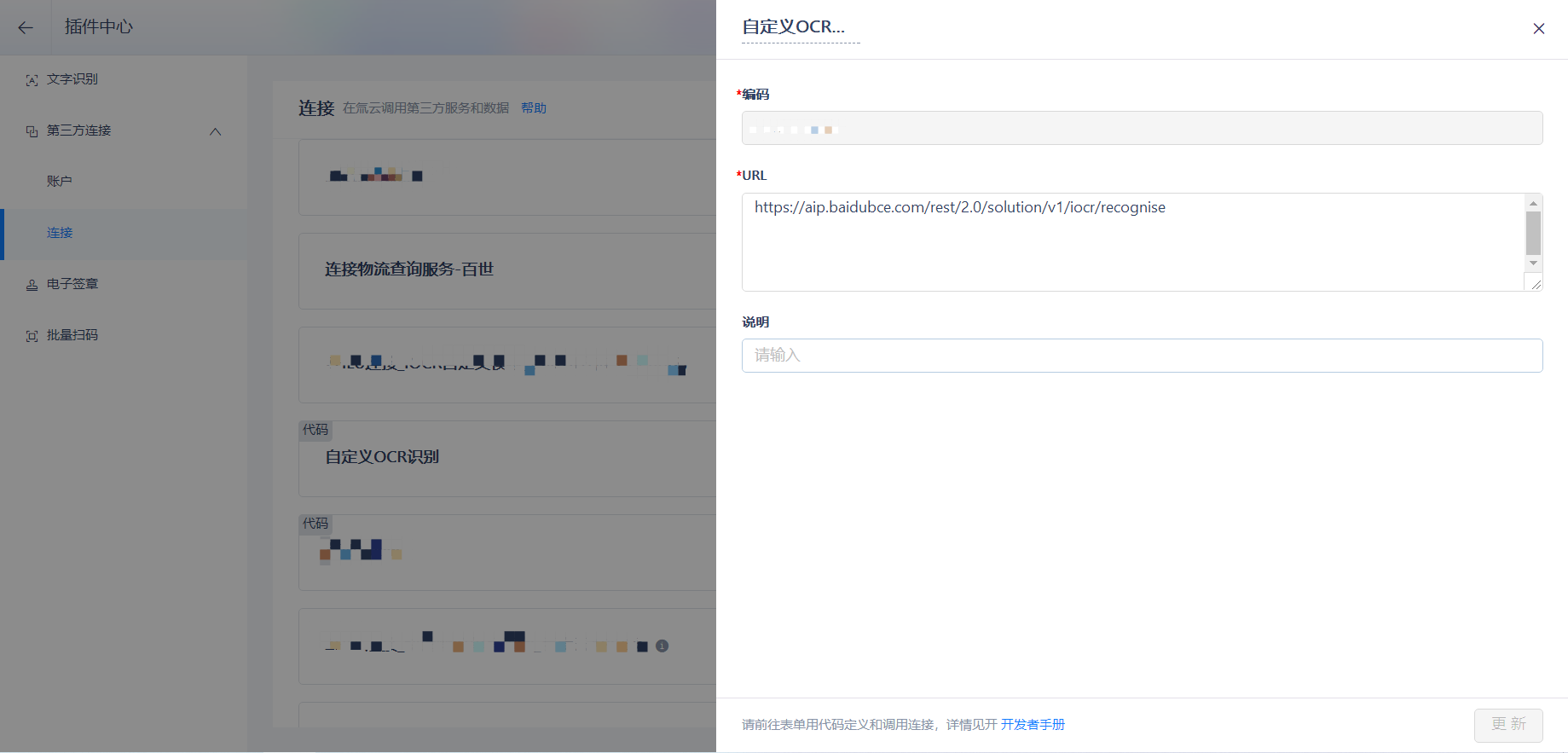
前往插件中心>第三方连接>连接,新增连接(代码),配置连接编码和 URL。
⚠️ 注意
第三方 URL 接口返回的格式必须为 JSON 格式且第一层不能是数组。
| 返回格式 | 是否正确 |
|---|---|
| { "time": 10000, "desc": "说明" } | 正确 |
| [{ "time": 10000, "desc": "说明" }] | 错误 |
调用第三方连接
配置完成后,可以前往表单,编写自定义代码调用第三方接口。
假设第三方接口返回以下数据结构:
{
    "status": 200,
    "msg": {
        "context": [{
            "time": 10000,
            "desc": "说明"
        }],
        "state": "",
        "com": "",
        "status": "",
        "_support_from": "",
    }
}
protected override void OnSubmit(string actionName, H3.SmartForm.SmartFormPostValue postValue, H3.SmartForm.SubmitSmartFormResponse response)
{
    if(actionName == "Invoke")
    {
        // 根据第三方接口返回值编写返回结构
        // 因为 context 是对象,需要声明一个 H3.BizBus.BizStructureSchema 类型的结构
        H3.BizBus.BizStructureSchema contextSchema = new H3.BizBus.BizStructureSchema();
        contextSchema.Add(new H3.BizBus.ItemSchema("time", "时间", H3.Data.BizDataType.TimeSpan, null));
        contextSchema.Add(new H3.BizBus.ItemSchema("desc", "说明", H3.Data.BizDataType.String, null));

        // msg 是对象,需要声明一个 H3.BizBus.BizStructureSchema 类型的结构
        H3.BizBus.BizStructureSchema msgSchema = new H3.BizBus.BizStructureSchema();
        // context 是数组,使用 H3.Data.BizDataType.BizStructureArray 类型
        msgSchema.Add(new H3.BizBus.ItemSchema("context", "内容数组", H3.Data.BizDataType.BizStructureArray, contextSchema));
        msgSchema.Add(new H3.BizBus.ItemSchema("state", "状态", H3.Data.BizDataType.String, null));
        msgSchema.Add(new H3.BizBus.ItemSchema("com", "公司", H3.Data.BizDataType.String, null));
        msgSchema.Add(new H3.BizBus.ItemSchema("status", "状态", H3.Data.BizDataType.String, null));
        msgSchema.Add(new H3.BizBus.ItemSchema("_support_from", "支持方式", H3.Data.BizDataType.String, null));

        H3.BizBus.BizStructureSchema structureSchema = new H3.BizBus.BizStructureSchema();
        structureSchema.Add(new H3.BizBus.ItemSchema("status", "返回码", H3.Data.BizDataType.Int, null));
        // msg 不是数组对象,使用 H3.Data.BizDataType.BizStructure 类型
        structureSchema.Add(new H3.BizBus.ItemSchema("msg", "返回内容", H3.Data.BizDataType.BizStructure, msgSchema));
        // HEADER 参数
        Dictionary<string, string> headers=new Dictionary<string, string>();
        // BODY 参数
        Dictionary<string, object> bodys=new Dictionary<string, object>();
        // QUERY 参数
        Dictionary<string, string> querys=new Dictionary<string, string>();
        querys.Add("com", "zhongtong");
        querys.Add("src", "543504132797");
        headers.Add("Authorization", "APPCODE fc5fa66a3ad8459a9692d7e11d8ec1a7");
        // 调用 Invoke 接口,系统底层访问第三方 WebService 接口的 Invoke 方法
        H3.BizBus.InvokeResult InResult = this.Engine.BizBus.InvokeApi(
            H3.Organization.User.SystemUserId,
            H3.BizBus.AccessPointType.ThirdConnection,
            "chenbing20210224", // 连接编码,调用哪一个连接
            "POST", // Http 请求方式
            "application/x-www-form-urlencoded;charset=UTF-8", // 请求参数传输方式
            headers,
            querys,
            bodys,
            structureSchema // 返回值结构
        );
        if(InResult != null)
        {
            int Code = InResult.Code; // 调用是否成功
            if(Code == 0)
            {
                // 获取返回数据,返回数据整个会转化为 H3.BizBus.BizStructure 类型的对象,
                // 然后根据属性 Key 读取对应的值,注意类型的转化
                H3.BizBus.BizStructure Obj = InResult.Data;
                // msg 是 H3.Data.BizDataType.BizStructure 类型,转换为 H3.BizBus.BizStructure
                H3.BizBus.BizStructure msgObj =Obj["msg"] as H3.BizBus.BizStructure;
                // context 是 H3.Data.BizDataType.BizStructureArray 类型,转换为 H3.BizBus.BizStructure[]
                H3.BizBus.BizStructure[] contextObj =msgObj["context"] as H3.BizBus.BizStructure[];
                // 其他基本类型按基本类型转换
                string codee=contextObj[0]["desc"] as string;
                this.Request.BizObject["F0000002"]=codee;
            }
            else
            {
                // 获取错误信息
                string ErrorMessage = InResult.Message;
            }
        }
        return;
    }
    base.OnSubmit(actionName, postValue, response);
}
账户
第三方需要验证连接者身份,确定连接者是否有权限访问资源,再决定是否返回用户请求的资源。鉴权是一种安全机制。账户用于存储鉴权信息,即身份验证信息。避免在代码中直接展示敏感信息,可使用账户存储,再前往表单通过代码调用账户信息。
支持的账户类型:
- 百度 AI 开放平台:支持调用 access_token,调用时判断有效期,过期更新。
- 阿里云 API 市场:支持调用 AppCode。
- 百度云 API 市场:支持调用 AppCode。
- 第三方平台企业内部应用:支持调用 access_token,调用时判断有效期,过期更新。
- 用友 U8:支持代码调用 token,调用时判断有效期,过期自动更新。
- Basic Authentication:支持调用所有自定义参数,例如阿里云 API 市场。
配置账户
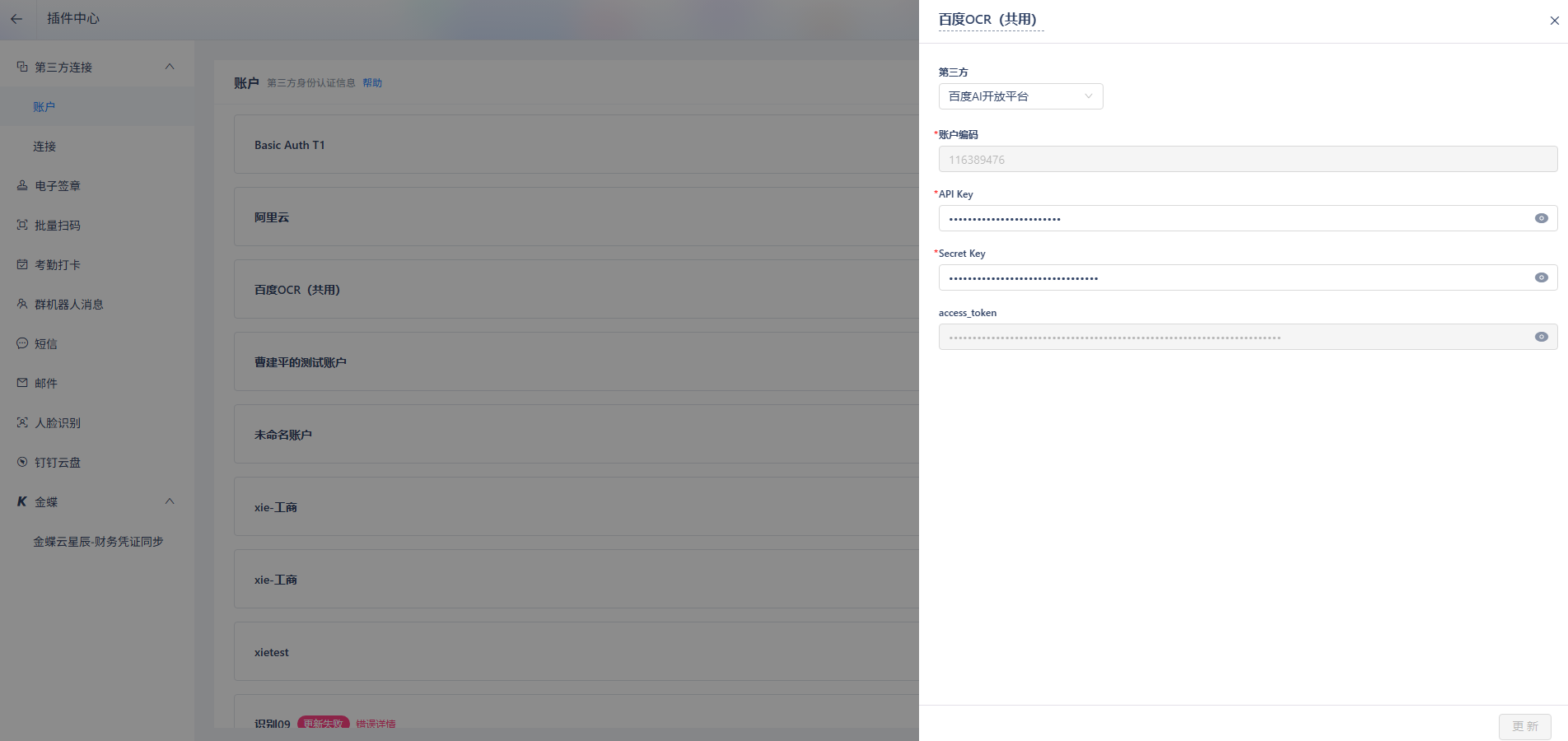
前往插件中心>第三方连接>账户,新建账户,选择第三方,填写账户编码,以及第三方所需信息。
读取账户信息
如果第三方连接需要账户信息做身份验证,需要先读取账户信息,示例如下:
// 账户信息返回值结构
H3.BizBus.BizStructureSchema structureSchema = new H3.BizBus.BizStructureSchema();
//返回字段值参考:
//阿里云API市场:Authorization;
//百度云API市场:X-Bce-Signature
//百度AI开放平台: access_token
//用友U8:token
//钉钉企业内部应用:access_token
structureSchema.Add(new H3.BizBus.ItemSchema("access_token", "授权码", H3.Data.BizDataType.String, null));

// 调用 Invoke 接口
H3.BizBus.InvokeResult InResult = this.Engine.BizBus.InvokeApi(
    H3.Organization.User.SystemUserId,
    H3.BizBus.AccessPointType.ThirdAuthToken,
    "h3-robot", // 账户编码
    null, null, null, null, null,
    structureSchema);
if(InResult != null)
{
    int Code = InResult.Code; // 调用是否成功
    if(Code == 0)
    {
        // 获取返回数据
        H3.BizBus.BizStructure Obj = InResult.Data;
        string appCode = Obj["access_token"] as string;
    }
    else
    {
        // 获取错误信息
        string ErrorMessage = InResult.Message;
    }
}
加密算法
通过第三方连接调用淘宝、京东商家、抖店、快手电商等开放平台接口时,为防止 API 在调用过程中被恶意拦截篡改,第三方要求调用 API 时需携带签名参数。第三方服务端会根据请求参数验证签名,签名不合法的请求将被拒绝。
加密算法:
- MD5
- SHA1
- HMAC(HMACSHA1、HMACSHA256、HMACSHA384、HMACSHA512)
加密算法类(对数据进行加密,返回 base64 编码结果):
H3.Security.Cryptography.MD5H3.Security.Cryptography.SHA1H3.Security.Cryptography.HMAC
MD5 加密示例
将 abc123 进行 MD5 加密,编码格式为 UTF8,返回结果为 6ZoYxCjLONXyYIU2eJIuAw==。
string result = H3.Security.Cryptography.MD5.MD5Encrypt("abc123",System.Text.Encoding.UTF8);
HmacSHA256示例
将 abc123 进行 HmacSHA256 加密,编码格式为 UTF8,返回结果为 NBaoyFtWd7xebliBvxq/Pfmw070Ju/ETPJxfnu1S0g8=。
string result = H3.Security.Cryptography.HMAC.HMACSHA256Encrypt("abc123",System.Text.Encoding.UTF8);