Webservice
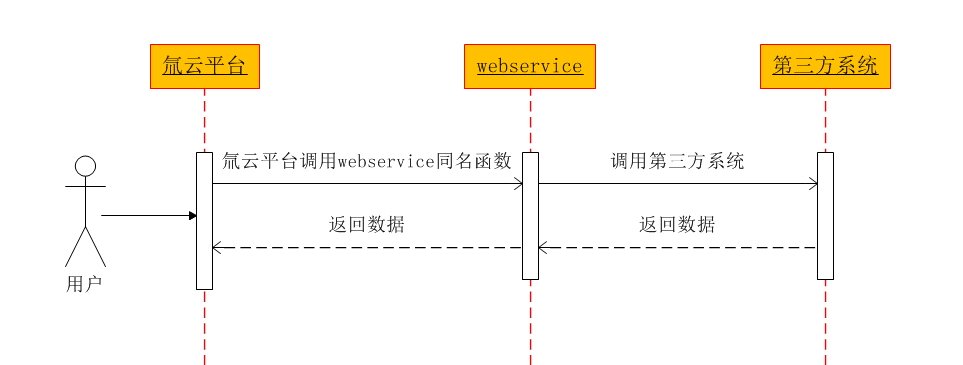
该方法通过开发中间层 WebService 服务实现,由 WebService 服务调用第三方系统返回数据,将数据转义为 JSON 字符串后,通过 SOAP 协议回传给 氚云。
💡 提示
当前不推荐使用 WebService 方式,建议采用第三方连接。
业务流程
WebService 开发规范
WebService 需按以下规范开发,仅支持 4 个同名接口(大小写需完全一致),所有接口返回类型均为 JSON 字符串。
| 序号 | 函数 | 说明 |
|---|---|---|
| 1 | GetSchema(string schemaCode) |
返回指定 schemaCode 的数据结构 |
| 2 | GetSchemaList() |
获取全部表单数据结构字典 |
| 3 | GetList(string userCode, string schemaCode, string filter) |
查询数据列表 |
| 4 | Invoke(string userCode, string schemaCode, string methodName, string param) |
执行指定方法 |
开发示例(C#)
namespace DingtalkWebService
{
    [WebService(Namespace = "http://tempuri.org/")]
    [WebServiceBinding(ConformsTo = WsiProfiles.BasicProfile1_1)]
    [System.ComponentModel.ToolboxItem(false)]
    public class DingWebService : System.Web.Services.WebService
    {
        [WebMethod]
        public string GetSchema(string schemaCode)
        {
            return string.Empty; // 返回JSON字符串
        }

        [WebMethod]
        public string GetSchemaList()
        {
            return string.Empty; // 返回JSON字符串
        }

        [WebMethod]
        public string GetList(string userCode, string schemaCode, string filter)
        {
            return string.Empty; // 返回JSON字符串
        }

        [WebMethod]
        public string Invoke(string userCode, string schemaCode, string methodName, string param)
        {
            // 调用第三方接口逻辑
            return string.Empty; // 返回JSON字符串
        }
    }
}
Invoke 方法返回的 JSON 字符串格式示例。
{
    "ResultCode": "0",
    "Message": "",
    "Schema": {
        "Code": "Student",
        "Items": [{
                "Name": "Name",
                "DisplayName": "学生姓名",
                "DataType": "String"
            }, {
                "Name": "Age",
                "DisplayName": "学生年龄",
                "DataType": "Int"
            }, {
                "Name": "ReturnData",
                "DisplayName": "子表数据",
                "DataType": "BizStructureArray",
                "ChildSchema": {
                    "Code": "ResultObject",
                    "Items": [{
                            "Name": "ResultCode",
                            "DisplayName": "执行结果代码",
                            "DataType": "Int"
                        }, {
                            "Name": "ErrorMessage",
                            "DisplayName": "异常原因",
                            "DataType": "String"
                        }
                    ]
                }
            }
        ]
    },
    "Data": {
        "Name": "张三",
        "Age": "10",
        "ReturnData": [{
                "ResultCode": "0",
                "ErrorMessage": "0"
            }, {
                "ResultCode": "1",
                "ErrorMessage": "1"
            }
        ]
    }
}
配置 WebService 集成
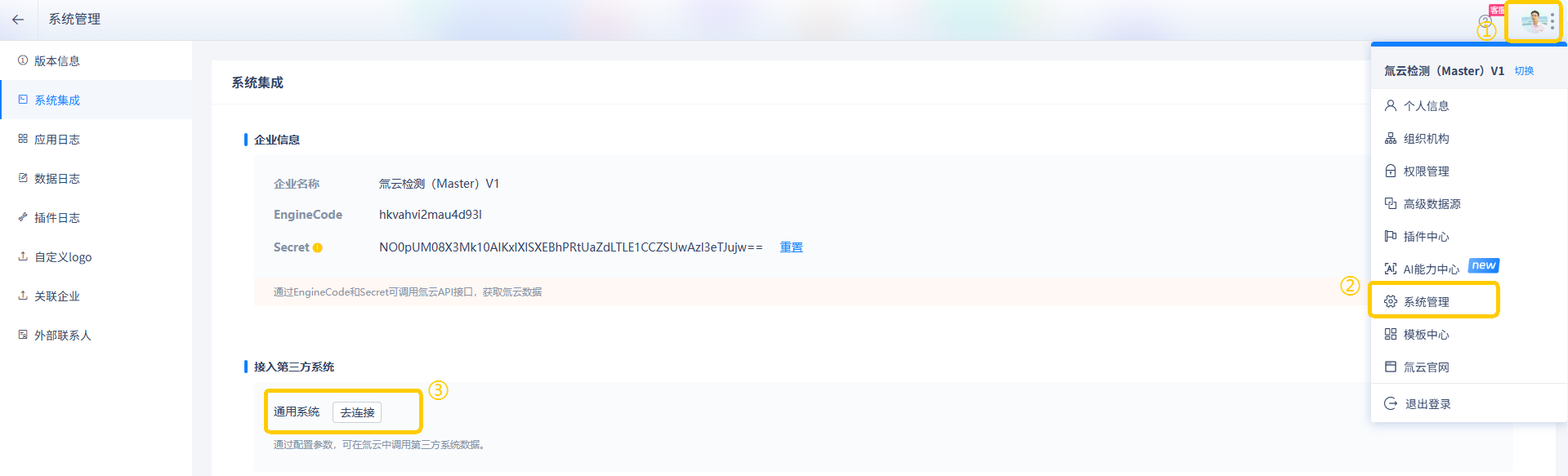
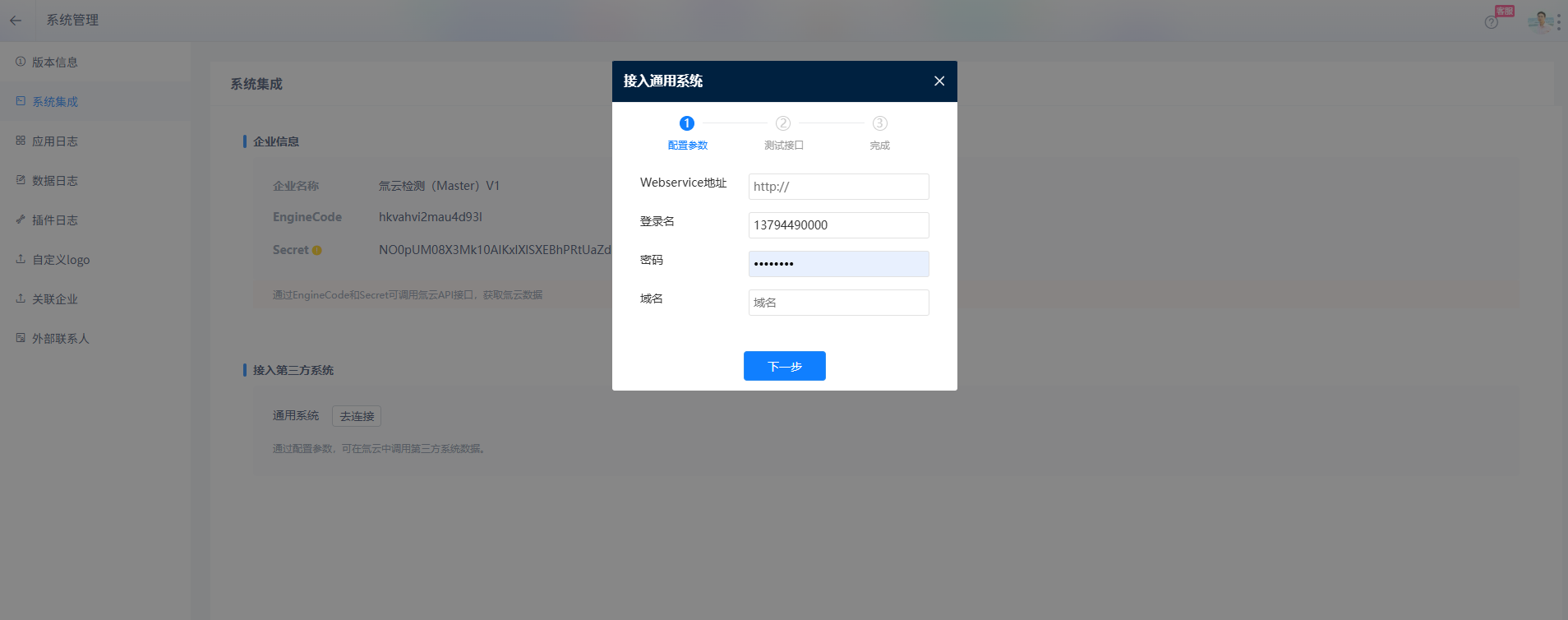
将开发完成的 WebService 部署至服务器并发布访问地址(需确保外网可访问),在 氚云 系统中配置该地址至 接入通用系统 模块,操作路径如下:系统集成 > 接入第三方系统 > 接入通用系统。

⚠️ 注意
若 WebService 未按规范开发,系统将提示连接失败。
调用 WebService 方法
以下为在 氚云 自定义代码中调用 WebService 的 Invoke 方法示例:
protected override void OnSubmit(string actionName, H3.SmartForm.SmartFormPostValue postValue, H3.SmartForm.SubmitSmartFormResponse response)
{
    if(actionName == "Invoke")
    {
        // 主表参数结构
        H3.BizBus.BizStructureSchema paramSchema = new H3.BizBus.BizStructureSchema();
        paramSchema.Add(new H3.BizBus.ItemSchema("BillsCustomer", "客户", H3.Data.BizDataType.ShortString, 200, null));
        paramSchema.Add(new H3.BizBus.ItemSchema("TotalMoney", "总计", H3.Data.BizDataType.Double, 200, null));

        // 子表参数结构
        H3.BizBus.BizStructureSchema detailsSchema = new H3.BizBus.BizStructureSchema();
        detailsSchema.Add(new H3.BizBus.ItemSchema("Type", "收款类型", H3.Data.BizDataType.ShortString, 200, null));
        detailsSchema.Add(new H3.BizBus.ItemSchema("Money", "金额", H3.Data.BizDataType.Double, 200, null));

        // 主表赋值
        paramSchema.Add(new H3.BizBus.ItemSchema("details", "明细", H3.Data.BizDataType.BizStructureArray, detailsSchema));
        H3.BizBus.BizStructure paramData = new H3.BizBus.BizStructure(paramSchema);
        paramData["BillsCustomer"] = "chen";
        paramData["TotalMoney"] = 123;

        // 子表赋值
        List<H3.BizBus.BizStructure> detailsDatas = new List<H3.BizBus.BizStructure>();
        for (int k = 0; k < 2; k++)
        {
            H3.BizBus.BizStructure detailsData = new H3.BizBus.BizStructure(detailsSchema);
            detailsData["Type"] = "氚云";
            detailsData["Money"] = 11;
            detailsDatas.Add(detailsData);
        }
        paramData["details"] = detailsDatas.ToArray();

        // 调用Invoke接口
        string schemaCode = "第三方表单编码";
        H3.BizBus.InvokeResult InResult = this.Engine.BizBus.Invoke(
            H3.Organization.User.SystemUserId,
            H3.BizBus.AccessPointType.Legacy,
            schemaCode,
            "自定义方法名称",
            paramData
        );

        if (InResult != null)
        {
            if (InResult.Code == 0) // 调用成功
            {
                H3.BizBus.BizStructure Obj = InResult.Data; // 获取返回数据
            }
            else
            {
                string ErrorMessage = InResult.Message; // 获取错误信息
            }
        }
    }
    base.OnSubmit(actionName, postValue, response);
}